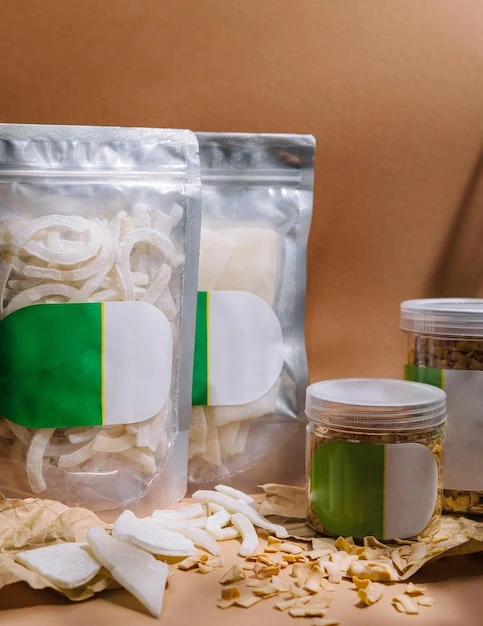
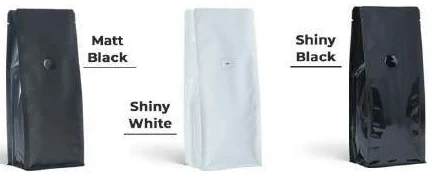
Plan a flat-bottom pouch as a set of connected faces, each with a defined information job. The front sells the product identity, the back supports use and purchase decisions, and side or base panels should carry content only where it remains visible and correctly oriented. Approve the layout on the actual construction before releasing artwork.
Establish the actual panel architecture
Ask for a drawing showing front, back, sides, base, folds and seals. Suppliers can use overlapping names for pouch formats, so confirm the physical construction before describing it in procurement records. Thomson's flat-bottom description identifies a rectangular base and separate panel areas. Your proposed sample should show the specific version being offered.
Mark which panel is the default front. Add arrows showing the top direction on every view. This small step prevents side text or a base logo being rotated incorrectly when a flat artwork file is assembled into the final shape.
Trace the panel junctions before placing content
A flat-bottom pouch is read as a standing object, while its artwork is prepared as flat regions. The transition between those views creates the main layout risk. Mark where a side turns away, where a base becomes hidden and where a seal interrupts a continuous graphic. Give each boundary a name reviewers can use.
Use a simple numbered mock-up before refining colours. Place a large arrow on every panel showing its intended top. Fold or assemble it according to the supplier's construction, then compare the numbers with the artwork file. This inexpensive exercise can reveal a reversed side panel before several SKUs inherit the mistake.
Keep adjacent artwork relationships deliberate. A landscape image spanning the front and side may tolerate some visual interruption. A short instruction split across that junction may become difficult to read. The designer should know whether continuity is decorative or essential to meaning.
Record the physical review state. An empty folded mock-up helps establish orientation; a filled sample reveals curvature and the actual visible region. Neither replaces the other. Where the sample uses a different structure from production, identify that difference and ask which layout observations remain useful for the proposed construction.
Write a panel-job schedule
Give the front an immediate identification task: brand, product and variant. Put detailed product information on an area the customer can inspect without unfolding seals. Use side panels for supporting stories, instructions or range identity only if those areas remain readable in the intended display.
Do not place a critical instruction on the base simply because space is available. Consider how the customer holds the filled pack and whether turning it over would interfere with an opening. Let the responsible content reviewer decide where mandatory text belongs; the panel schedule helps the designer preserve visibility without making legal assumptions.
Reserve identifiers around real folds
GS1's placement guidance calls for packaging and printing review where folds or flaps could obscure a barcode. The direct lesson is placement coordination. The appropriate symbol, dimensions and verification requirements still depend on the actual scanning application.
Give the identifier region its own drawing reference. Do not treat it as the last blank space after the rest of the design is complete. Check the location on the folded and filled construction, including the customer's likely handling and any display support covering part of the panel.
Keep printed fixed identifiers separate from variable production codes in the approval table. One may be part of the released artwork, while the other is applied through the packing operation. Their equipment, review owner and evidence can differ even when the two regions appear beside each other.
For an illustrative project, a side panel carries a range story and a fixed product identifier. The filled sample curves the story around the corner and leaves the identifier near a fold. The team moves the story rather than reducing the identifier arbitrarily. It then asks the responsible printing and code reviewers to assess the revised location on the actual proposal.
Use a panel-priority worksheet
| Face | Intended viewing moment | Content priority | Physical check |
|---|---|---|---|
| Front | First shelf approach | Product and variant | Filled front visibility |
| Back | Deliberate inspection | Supporting product information | Readable without unfolding |
| Left side | Oblique shelf view | Range or use cue | Correct orientation |
| Right side | Handling and comparison | Secondary supporting content | Fold interference |
| Base | Specific handling moment | Optional low-priority content | Actual base geometry |
This original worksheet is a hierarchy tool, not a claim that every flat-bottom pouch has identical printable areas. Record any construction restrictions supplied with the approved drawing.
Test the layout as a folded object
Make a plain mock-up with panel names and arrows before evaluating detailed graphics. Fill and close it in the intended way. Photograph the standing pack from front, back and both oblique angles. Inspect transitions where graphics meet a fold or seal; alignment on a flat screen can hide awkward interruption in the assembled pack.
SEE's format overview illustrates side-gusset and flat-base features. Use a format reference to understand vocabulary, then apply the supplier's actual usable-area boundaries. Do not transfer another manufacturer's production or material claims into your own specification.
Decide which content deserves the best surface
List the questions customers need answered immediately and those they seek during deliberate inspection. Product and variant recognition usually require a different viewing moment from a detailed instruction. Assign a priority to the task rather than to the department that supplied the copy.
Use a content budget for each face. Record the approved text blocks, optional graphic elements and the feature or fold regions reserved by the converter. The budget need not prescribe font sizes. It exposes an overfilled panel early enough for the content owner to edit or relocate material intelligently.
If the back becomes crowded, examine the side-panel jobs before changing the physical pack. Some supporting material may move without damaging the reading sequence. Conversely, mandatory or important use information should not be moved to a hidden base merely because the base has spare area. The responsible reviewer must confirm the final information arrangement.
Assess the range as well as the individual pouch. A consistent side-panel structure can help people compare products, but different products may need different copy lengths. Preserve a recognisable hierarchy while allowing those real differences. A visually identical grid is less useful if one SKU's directions become difficult to read.
Keep variable information accessible
Agree where batch or other variable information will be applied and read. Ask the packing team to assess access in its actual process. Keep the code region distinct from decorative details that make verification difficult. If a secondary label is used, review adhesion and placement on the proposed material through the responsible technical team.
For an illustrative layout decision, a side panel may look ideal for a long product story but curve into the customer's grip when the pouch is full. Move the story or shorten it after observing the sample. Do not approve it solely because the flat panel has sufficient area.
Diagnose a panel problem before changing the artwork
When content disappears on the filled sample, determine what physically changed its view. It may sit behind a fold, curve away from the front, meet a seal or be covered by the display tray. Mark the affected region on a photograph and link it to the drawing. A broad request to improve visibility gives the designer too little information.
Separate orientation errors from space errors. Rotated side text requires a different correction from excessive copy. A misplaced code region may need packing and printing review rather than a stylistic adjustment. Keep these actions in separate rows so the next proof shows whether each was resolved.
For a candidate change, identify the downstream files affected. Moving a panel boundary can alter several SKU layouts and the code region. Revising a story paragraph may leave construction unchanged. Record that distinction so an artwork-only correction does not accidentally reopen settled structural work.
Retain front, back, side and base references together. A single hero image is insufficient evidence of complete panel approval. The release owner should be able to follow every face from the drawing to its approved artwork and sample view. That record supports repeat orders and later changes without depending on the original designer's memory.
Flat-bottom panels: a practical specification example
A pack is shortlisted for its shape, then its panels are divided between artwork and functional features. Work from the filled geometry: a bottom gusset, side gusset and flat base are distinct constructions. Establish where the product will settle, which panel the customer sees and which edge is used for filling. This prevents an artwork decision from silently changing the pack layout.
For this decision, start with the front, back, sides and base. The useful output is a panel map identifying the reading direction on each face. Put that output beside the relevant quotation, drawing or sample rather than leaving it in a separate email. This is an illustrative decision exercise, not a report of a completed customer trial.
Product references to make the discussion concrete
The catalogue includes flat-bottom pouches and side-gusset pouches. These examples show different physical constructions; they are not interchangeable specifications. A box-style base gives the filled pack a distinct footprint, with separate front, back and side panels. Compare a plain top opening with a regular zipper, and use filled samples to decide the shelf depth and panel proportions.
| Format reference | Material or construction to clarify | Details to include in the brief |
|---|---|---|
| Flat-bottom pouches | Flexible laminate with paper-look or opaque outer options; the appearance alone does not identify the full layer structure. | Base width and full opened depth; net fill and product bulk. |
| Side-gusset pouches | Paper-look and opaque or foil-look laminates are illustrated; confirm the actual inner and outer layers for the contents. | Face width and side-gusset convention; filled height and headspace. |
Use the reference pictures to identify the base, side panels, window or opening that you mean. A picture cannot supply the missing dimensions or material layers. If a photograph shows a finish or closure you do not want, state that difference explicitly; otherwise a visual reference can introduce an unintended requirement.
Complete the record before requesting the next sample
- Attach a panel map identifying the reading direction on each face. Identify the product or SKU and the date of the observation.
- Record the front, back, sides and base. Keep confirmed information separate from proposed values and questions for the supplier.
- Add the actual fill weight or volume, the dimension convention, material proposal and intended closure. Include the number of designs and quantity per design when requesting a quotation.
- State which question the next drawing, sample or quotation must resolve. A change of size, closure or material should remain visible alongside the earlier reference.
This record makes the next conversation specific. It lets the design, purchasing and packing teams work from the same proposed item and shows which decision still needs evidence. Review the related product pages for format details, or prepare a custom packaging brief with the unresolved requirements.

Release panel decisions with the drawing
Give the panel-job schedule the same revision link as the artwork and construction drawing. If a gusset or base changes, check the affected panel content again. Record which faces were reviewed on a filled sample and which remain open.
Send Navkar Poly Print the supplier-compatible drawing request, panel priorities and intended coding route. Ask for a sample that shows the final face relationships. That makes the next design discussion about readable information on the real pack rather than decorative use of unused space.
Sources and scope.
These references support the technical discussion. Product photographs illustrate formats; the material, dimensions and suitability of the proposed pack are confirmed for each project.
- Thomson Printing and Packaging: flat-bottom pouch
Manufacturer description of a flat rectangular base and pouch panels.
- SEE flat-bottom bag technical overview
Shows flat-bottom architecture, side gussets and distinct printable surfaces; no Navkar equipment inference.
- GS1: barcode placement in packaging
Placement guidance considers folds, flaps, packaging process and printing; project-specific symbol specifications still apply.
Let’s discuss your product.
Share your contents, dimensions, filling method, quantity and delivery destination. We’ll work through the proposed packaging specification with you.
Create a packaging brief